Put Grandma in the Story: Family Members Drawn From Their Photos
Add Grandma, Grandpa, a sibling or a cousin to your child's personalized storybook, drawn from their own photo. How it works, what it costs, and photo tips.
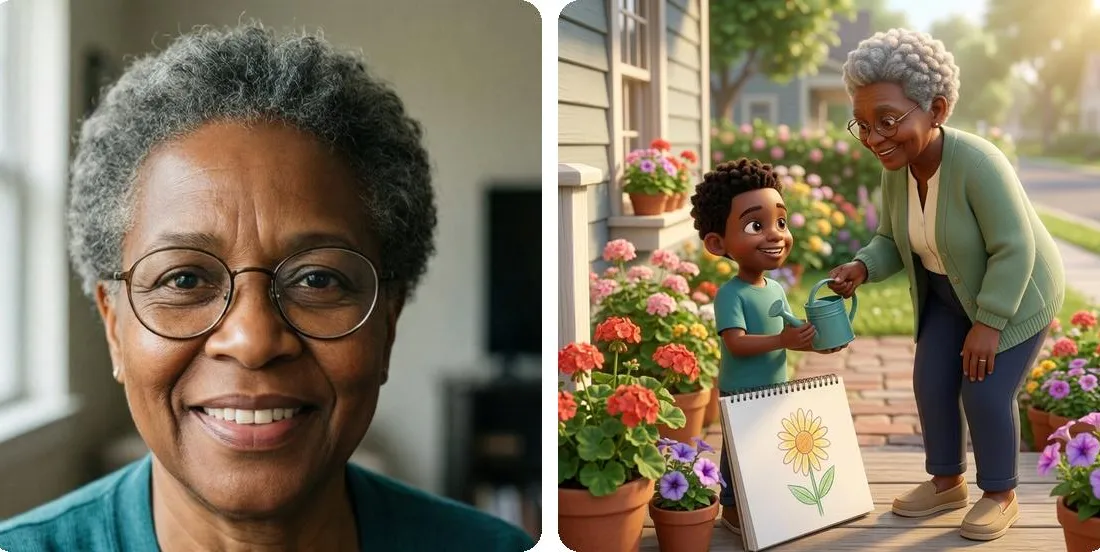
Example only: on the left, a photo of a grandmother; on the right, the same grandmother drawn into a story page with her grandson. Both people are AI-generated examples, not real customers.
Until November 5, the only person in an Akoni book drawn from a real photo was the child at the center of it. Grandma could be in the story, but she was drawn from a short description (hair color, hair type, skin tone), so she came out as a grandmother rather than your grandmother.
Now you can add a photo of Grandma when you make the book, and she is drawn from it, in the same art style as the rest of the book, right beside your child.
Who you can add
Up to three people can join your child in the story. For each one, you pick a relationship from the form’s list:
- Family: Mom, Dad, Grandma, Grandpa, Sister, Brother, Cousin, Aunt, Uncle
- Others: Friend, Teacher, Pet
Any of the three can be drawn from a photo, so the same button works for a best friend or the family dog. A pet’s photo should show one animal, and it doesn’t need the permission box described below.
Your child stays the hero. The story is written to give each person you add a real part, beside your child on several pages rather than a thank-you on the last one, and to bring them in within the first three illustrated pages, the ones your free preview shows.
How to add someone, step by step
- Go to akonibooks.com/create and fill in the basics as usual: Child’s Name, Age, your child’s photo under What does your child look like?, a Theme and an Art Style.
- Open Deeper customization. Family photos work on custom stories, which are written from scratch for your child and take a few minutes longer to make than the quick themes marked ⚡ Fast. If you leave this section closed, only your child is drawn from a photo.
- Under Who else is in the story?, tap + Add someone.
- Type their Name the way your child says it (Nana, Grandpa Joe, Aunt Lisa) and choose their Relationship.
- Fill in Hair, Hair type and Skin tone. For a sibling, cousin or friend you’ll also see an Age vs. your child dropdown and an optional Age. These details are the backup if the photo can’t be used, so they’re worth a few seconds.
- Tap Add a photo (optional) and choose a photo of that one person.
- Tick the permission box that appears under the photo (more on that below).
- Repeat for up to three people, then tap Make my free preview.
Before sending, the form checks that each photo has a name and, for a person, a ticked box. If not, it says so: “Please tick the permission box for Nana’s photo.”
What it costs
Drawing family members from their photos adds $9.99 per book, and the form shows that price right under the “Who else is in the story?” heading.
- It’s charged once per book, whether you add one photo or three.
- It’s charged only if at least one person in the book was actually drawn from their photo.
- Adding people without a photo costs nothing extra.
- Making the preview is free either way. At checkout your book is listed “with family photos” and the $9.99 is part of its price: the $29.99 softcover becomes $39.98, the $39.99 hardcover becomes $49.98. Standard shipping is included, and both come with the digital copy.
Photo tips
The form’s own advice is short: one person per photo, with their face clearly visible. A few more things help:
- Crop group shots. If your best photo of Grandpa is from a family reunion, crop it down to just him before uploading. A photo with more than one person in it gets set aside.
- Use the same rules as your child’s photo. The form’s tip there (clear, front-facing, good light, no sunglasses or hats covering the face) works just as well for grown-ups.
- Pick a photo that looks like them now. The portrait follows what’s in the picture, so you want the glasses they wear today and the haircut they have now.
- Check the file. JPG, PNG or HEIC, under 12 MB.
These portraits are made the same way your child’s is: AI-generated illustrations that use the photo as a reference, drawn in the art style you chose. They are stylized drawings, not photographs.
If a photo can’t be used
Each portrait drawn from a photo is checked against that photo for likeness, and redrawn once if it misses. If a photo still can’t be used (more than one person in it, a face that isn’t clear enough, or a likeness check that misses twice), that person is drawn from the details on their row instead, the way everyone was before November 5. Your preview isn’t held up, and if nobody in the book ends up drawn from a photo, the $9.99 isn’t charged.
No photo of someone? Add them anyway
You don’t need a photo to put someone in the story. Leave the photo off and they’re still written in and drawn from your description: relationship, hair, hair type, skin tone, and age for kids. You can mix the two in one book, too: Grandma from her photo, a cousin from a description.
Permission and privacy for other people’s photos
A photo of Grandma is Grandma’s photo, so the form asks for her say-so, not just yours. Each person’s photo comes with its own box:
I have permission to use this photo of [name]. [name] agreed, or, for a child, their parent or guardian agreed.
In practice: ask Grandma before you upload her picture. For a cousin or friend who’s still a child, ask their parent.
Here’s what our privacy policy says about those photos:
- They are used only to draw that person in your book.
- Uploaded photos, your child’s and everyone else’s, are deleted from our servers within 24 hours of the book being made, usually within minutes. The drawn portraits are kept with the book, the same way your child’s character is.
- Anyone pictured, or their parent or guardian, can ask us to delete their portrait by emailing hello@akonibooks.com.
- The photos go to the AI services that make the book (the policy names OpenAI and Google) and are never shared with advertising networks.
Good moments for it
A grandparent who lives far away. A grandparent who mostly appears on a screen can be in the bedtime story instead, read on the nights they can’t be there. If Grandma is also the one giving the book, she can be in it and sign it: whatever you type in Who’s this book from? prints on the dedication page. There are more ideas in our long-distance grandparent gift guide, and if it’s a Christmas present, our guide for grandkids far away has the order-by dates.
A new brother or sister. Keep the older child as the hero and add the baby as their Sister or Brother, from a photo if you have a clear one. It stays the older child’s story, with the baby in it, which is the whole point of a big-sibling gift.
A parent who’s away. For a parent who is deployed, working away from home or traveling for a stretch, add Mom or Dad from a photo, so they’re in the story at bedtime while they’re gone.
Try it free
Making a preview costs nothing and needs no card. You see the cover and the first three illustrated pages before you pay anything, so you can judge the likeness yourself. If your child doesn’t light up when they see it, email us within 30 days of delivery for a full refund, and they keep the book.
Family photos are one of several things we added this month. The roundup of everything new in November has the rest.